Kakao T English Guide 2026: Booking Korea Taxis Without a Local Card
Kakao T supports English and lets visitors set a pickup point, enter a destination, view a fare estimate, and follow the route without explaining the address in Korean. Direct payment is available only when a General or Regular taxi request shows that option; Kakao Mobility’s other taxi products require automatic payment. Travelers who cannot complete Kakao T registration or add a payment card can use k.ride, which Kakao Mobility documents for international users and overseas-issued cards.
Last verified: September 24, 2026.
For other useful services, see our Korea travel app guide.
Table of Contents
Why Kakao T Is Essential for Travelers
Kakao Mobility says taxi requests are available nationwide through Kakao T, but the products shown depend on the pickup and destination. Blue, Venti, Deluxe, Black, and other specialized services are not available in every area. International visitors can also compare k.ride, Kakao Mobility’s app for international users.
Last verified: September 24, 2026.
| Feature | Kakao T | Street Hail | Other Ride-Hailing Apps |
|---|---|---|---|
| Driver availability | Taxi requests are available nationwide; individual products vary by route | Can be unpredictable, especially late at night | Coverage varies by city |
| Destination setting | Map pin or English search | Usually explained verbally or shown to the driver | Map-based destination entry |
| Fare information | Estimated fare shown before the request | Metered fare | Upfront estimate or metered fare, depending on the service |
| Payment options | Automatic payment; direct payment only for General or Regular requests when offered | Pay the driver using a method the taxi accepts | Usually a linked payment card |
| Language support | English interface available | Communication depends on the driver | Usually multilingual |
How to Change Kakao T to English (Step by Step)
Kakao T account verification and payment availability can vary by phone number, country, and app version. If registration or card setup fails, use k.ride; Kakao Mobility documents phone-number signup with Google, Apple, or email verification and payment with overseas-issued cards for that service.
Last verified: September 24, 2026.
Step 1: Install the App
Download the official Kakao T app from the Apple App Store or Google Play Store. Check the developer name before installing it.
Step 2: Open My Info
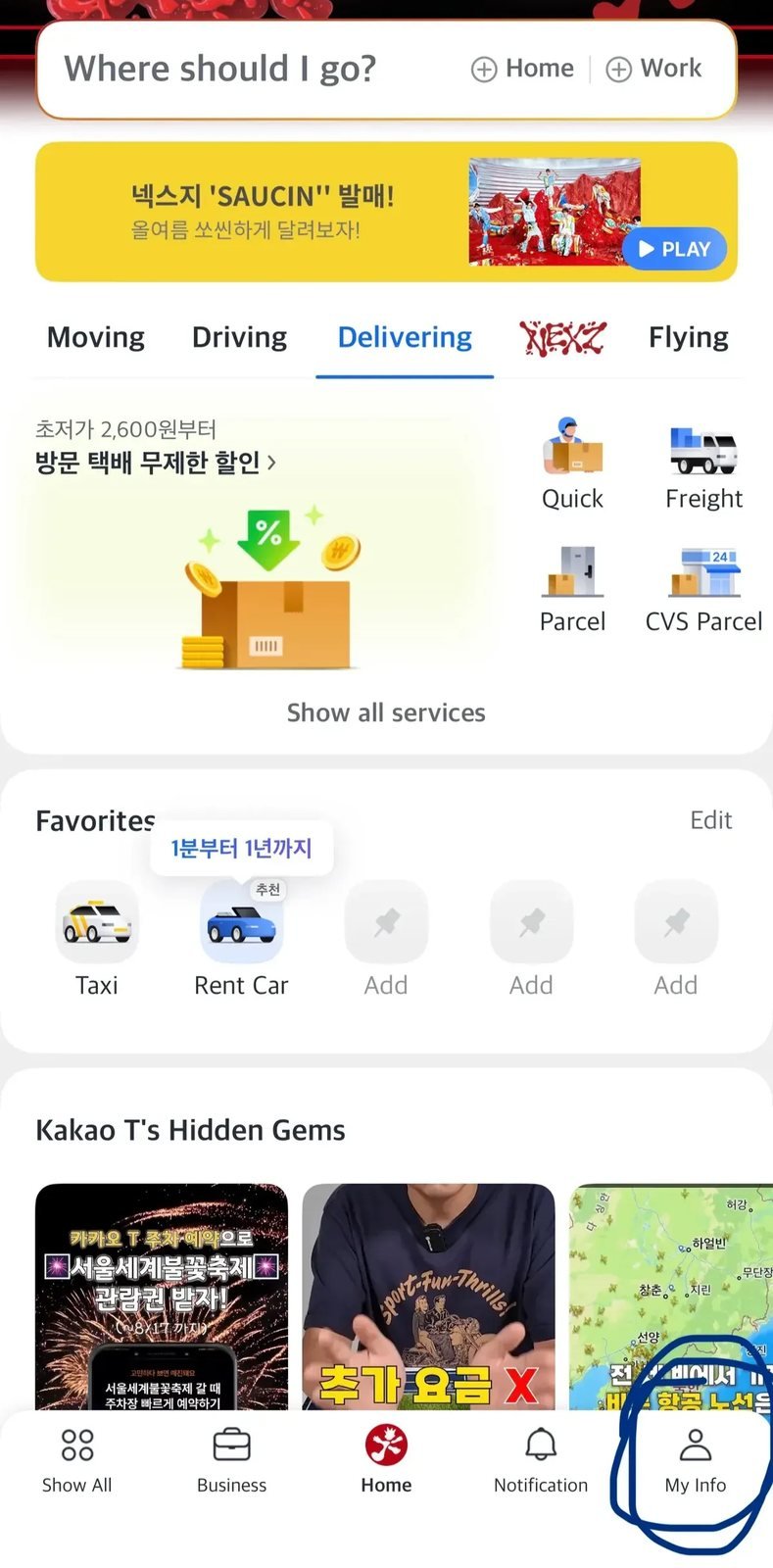
Open the app and tap My Info on the far right of the bottom navigation bar.
Step 3: Open Language Settings
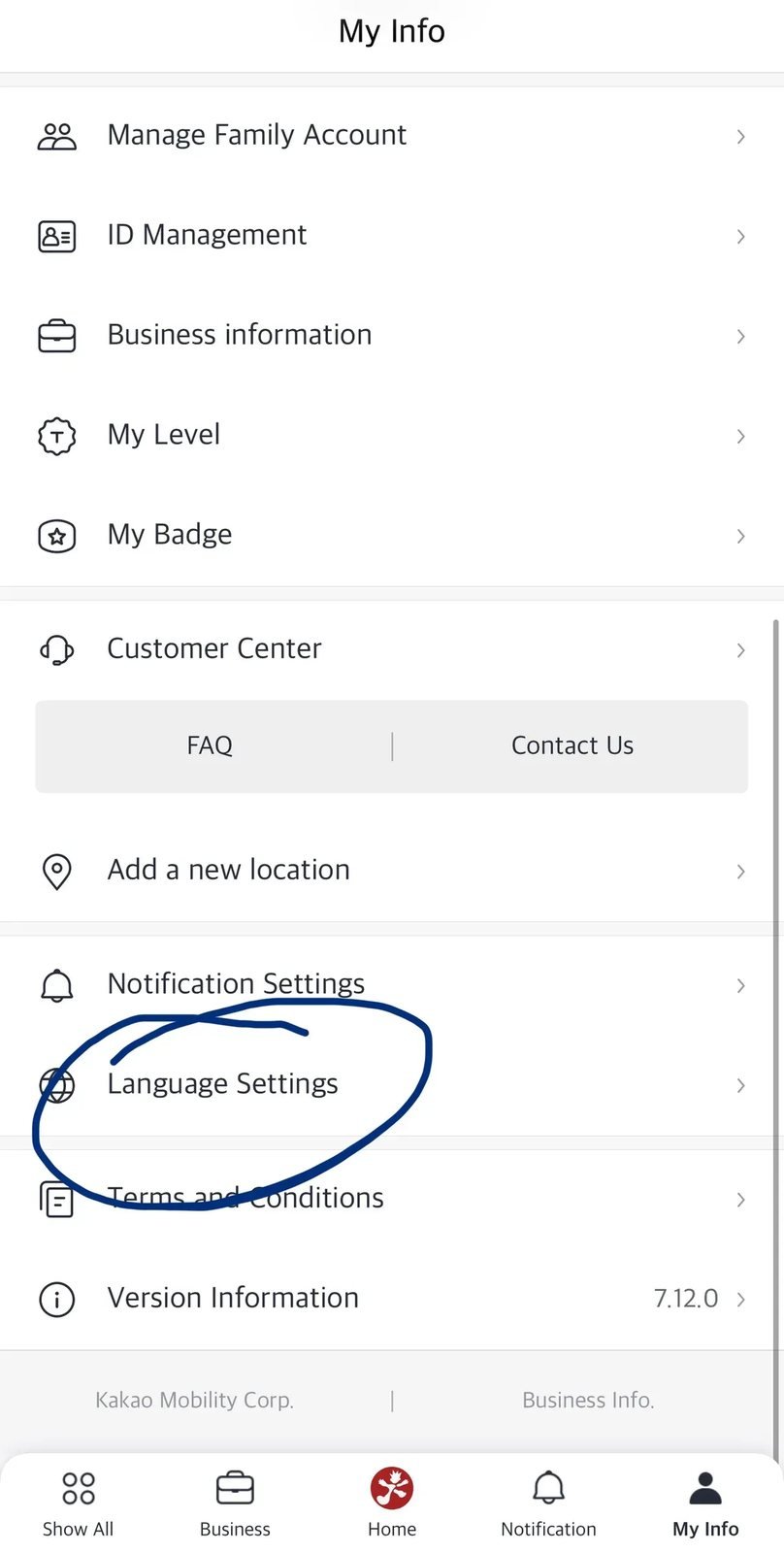
If your app version shows Language Settings under My Info, open it and choose English. Menu labels and placement can change between releases. The current Apple App Store listing identifies English, Japanese, and Korean as supported interface languages.
Last verified: September 24, 2026.
Step 4: Check the English Home Screen
Return to the home screen and open the destination search bar. You can search for major landmarks in English, but pasting the Korean address or place name often gives better results for small cafés, guesthouses, and lesser-known locations.
How to Choose Taxi Types and Compare Fares
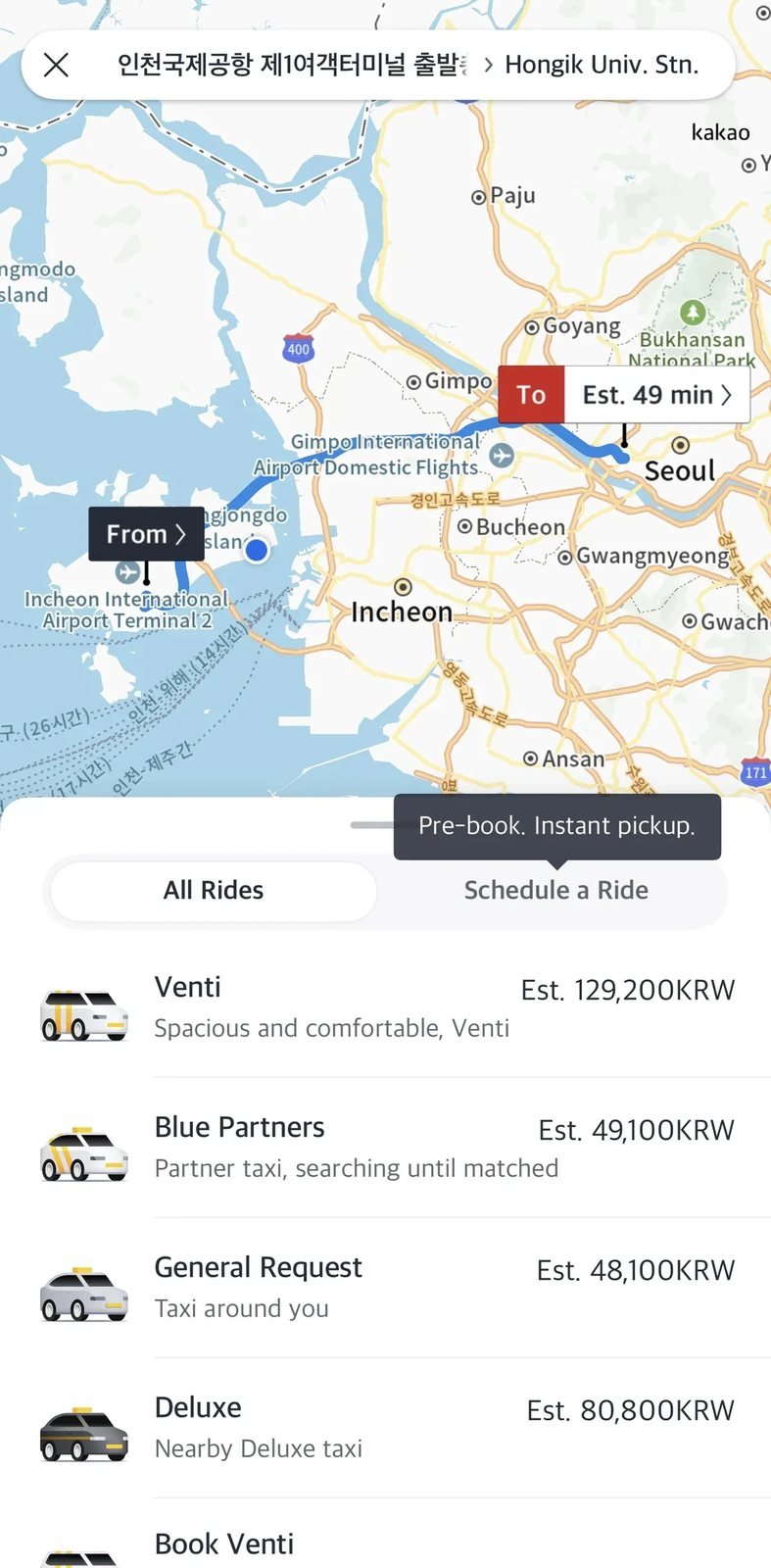
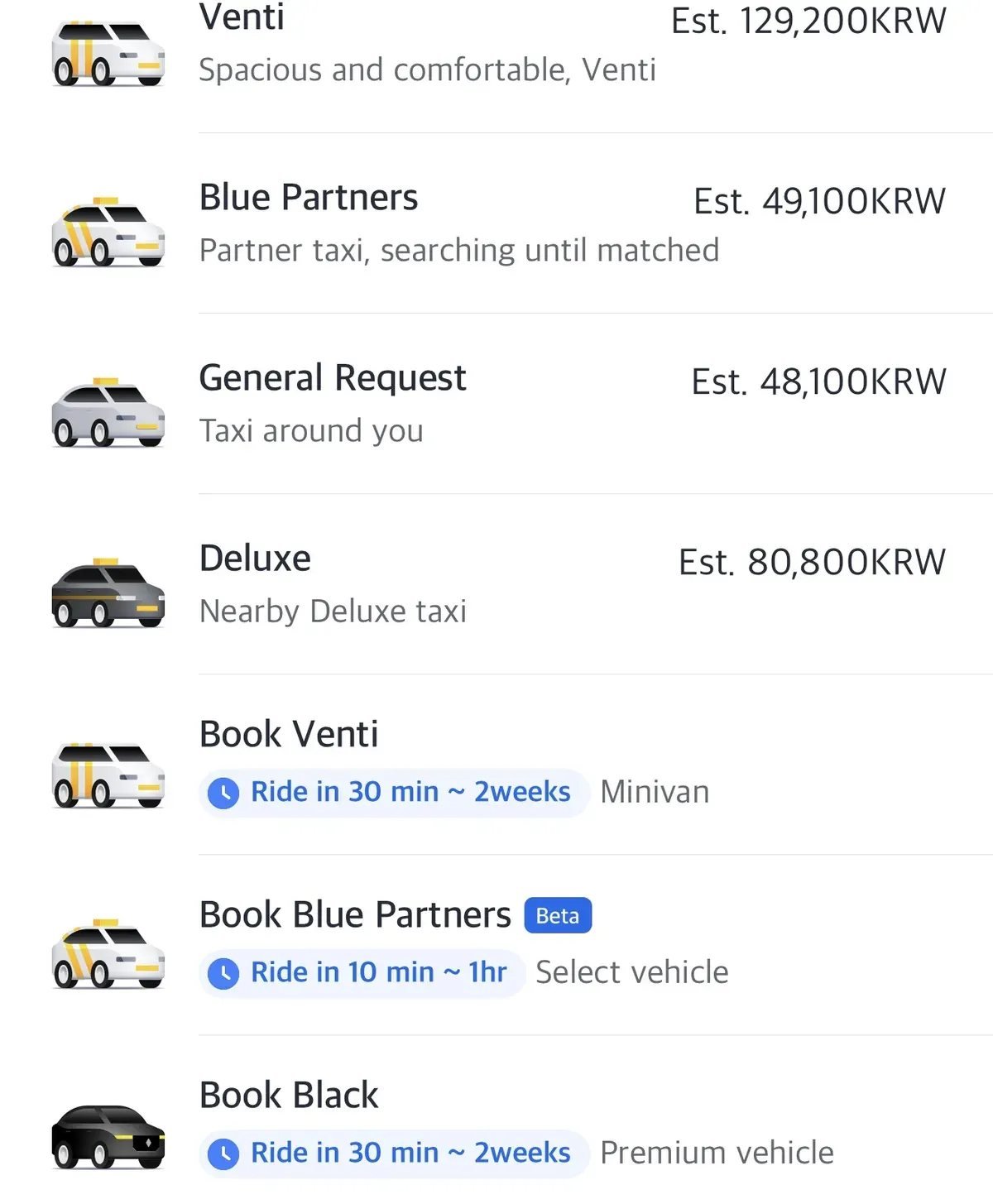
After you confirm your pickup point and destination, the app displays the taxi products available for that route and a fare estimate. Kakao Mobility’s current app listing includes Blue, Venti, Deluxe, and Black, while its taxi FAQ notes that specialized services are not available in every area.
Last verified: September 24, 2026.
- General or Regular: A standard taxi request. Kakao Mobility’s terms allow direct or automatic payment for this request type.
- Blue: A branded taxi option shown only on eligible routes.
- Venti: A larger-vehicle service useful for groups or travelers with several suitcases where available.
- Deluxe or Black: Premium services with higher pricing and limited regional availability.
If your trip starts at the airport, compare routes and luggage considerations in our Incheon Airport to Seoul guide.
How to Pay the Driver Directly
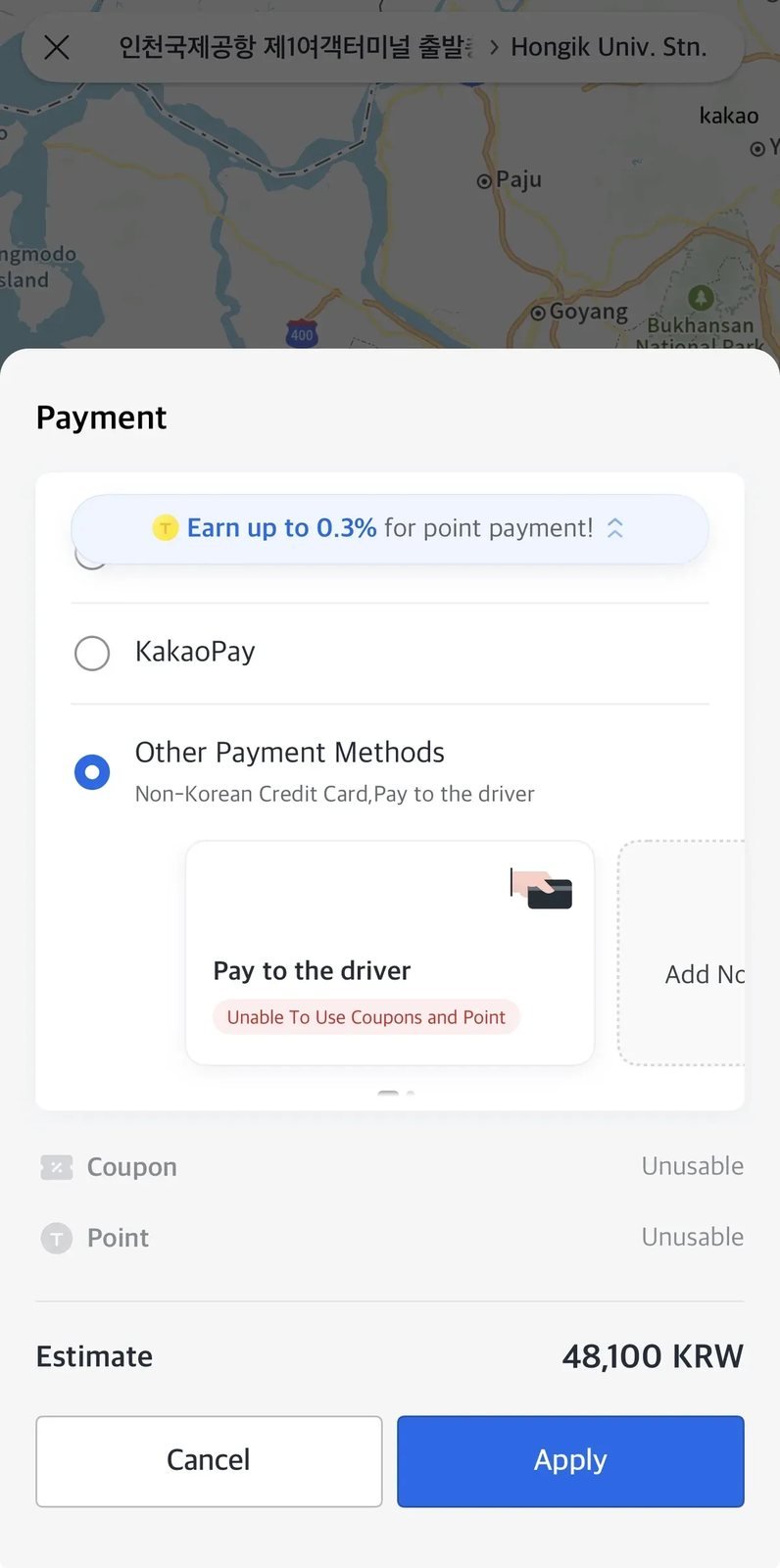
Use direct payment only when it appears on a General or Regular taxi request. Kakao Mobility’s paid-service terms state that other taxi-service requests use automatic payment, so Blue, Venti, Deluxe, Black, or another product may require a card registered in the app.
Last verified: September 24, 2026.
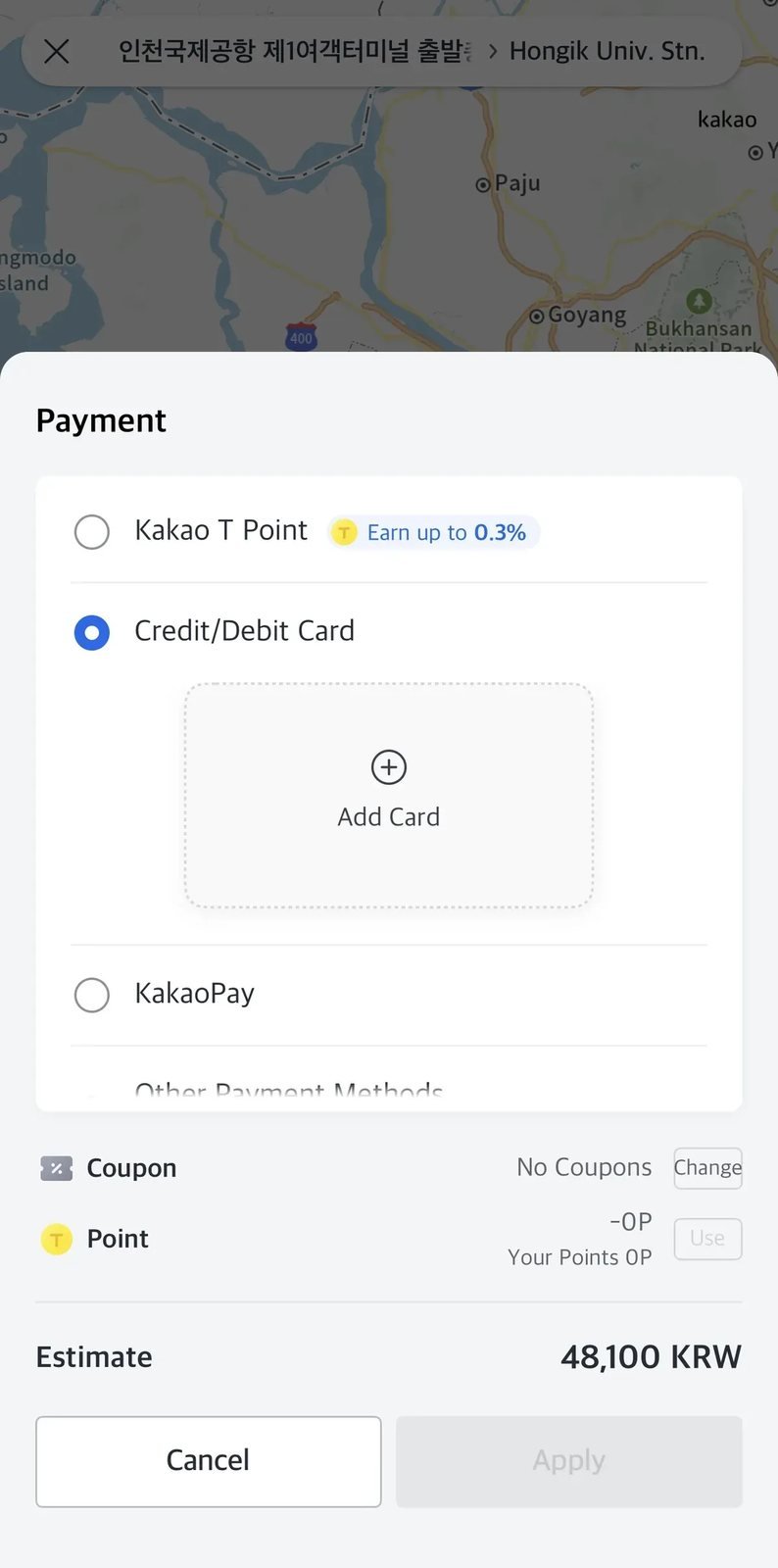
Choose “Pay to the driver”
- Select a General or Regular taxi request.
- Open the payment-method screen.
- If shown, select Other Payment Methods and then Pay to the driver.
- Tap Apply, review the pickup point and destination, and confirm the request.
If the direct-payment choice is absent, do not assume you can pay in the vehicle; switch to an eligible General or Regular request or use k.ride. Menu labels may differ by app version.
At your destination, check the total on the taxi meter or payment terminal and use a method that the vehicle accepts, such as a physical card or Korean won. Terminal and card acceptance can differ by taxi, so confirm with the driver and carry a backup payment method. Our Korea transit cards guide explains how T-money and WOWPASS differ.
Before paying, check the ride record. If the trip used automatic payment, do not pay the driver again. Kakao Mobility’s help center directs riders who were charged both automatically and in the vehicle to use the app’s trip record and payment-correction process.
Practical Tips for Taking Taxis in Korea
- No tipping is expected: Tipping is not customary in South Korea. Pay the metered fare plus any applicable tolls or surcharges.
- Check for late-night surcharges: Extra charges can apply during late-night hours, but the time window and rate vary by city and taxi type. Review the app estimate and the meter.
- Confirm the license plate: Match the last four digits shown in the app with the arriving taxi before you get in.
- Check the pickup pin: At airports, malls, and large stations, move the pin to the correct taxi stand or road level to avoid a missed pickup.
- Save the destination in Korean: A Korean address or place name is useful if the driver asks you to confirm the destination.
Frequently Asked Questions (FAQ)
Do Korean taxi drivers accept foreign credit cards?
In-vehicle card acceptance can differ by taxi and payment terminal. If you plan to use direct payment, confirm the available method with the driver and carry Korean won or another backup option.
Can I use Kakao T without a Korean phone number?
Kakao T verification is not guaranteed for every overseas number or country. If signup or payment setup fails, use k.ride, which Kakao Mobility specifically documents for international users, overseas-issued cards, and phone-number signup with Google, Apple, or email verification.
Is Kakao T free to download?
The Kakao T app is free to download. You still pay the taxi fare and any applicable tolls, surcharges, reservation charges, or service fees. Kakao Mobility states that Regular taxi requests have no service fee, while fees for other request types can vary with region, demand, and traffic conditions.
Last verified: September 24, 2026.
Related Travel Guides
- Korea travel app guide
- Incheon Airport to Seoul transportation guide
- Cash vs. Card in South Korea
- Korea transit card comparison
- Uber in Korea: Payment, Airport Pickups & When to Use It
Official reference sources: