Korea eSIM vs. Physical SIM: Do You Need a Korean Number?
Affiliate disclosure: This post may contain affiliate links. If you purchase or book through them, we may earn a small commission at no additional cost to you.
Choose by the type of connection you need. A data-only eSIM is usually enough for maps, messaging, translation, and app-based bookings. Choose a plan with an ordinary Korean number only when you expect local calls or SMS, restaurant waitlists, delivery contact, or another service that accepts that number.
A tourist phone number does not automatically provide Korean identity verification. Some reservations, delivery services, and local apps require a number tied to a resident identity, so confirm both the SIM package and the service requirement before paying. Hotspot support, voice, SMS, and local-number features vary by plan.
Last verified: September 24, 2026. Korea Tourism Organization currently lists both physical USIM and eSIM options for travelers; data, voice, text, hotspot, and local-number features vary by provider and package.
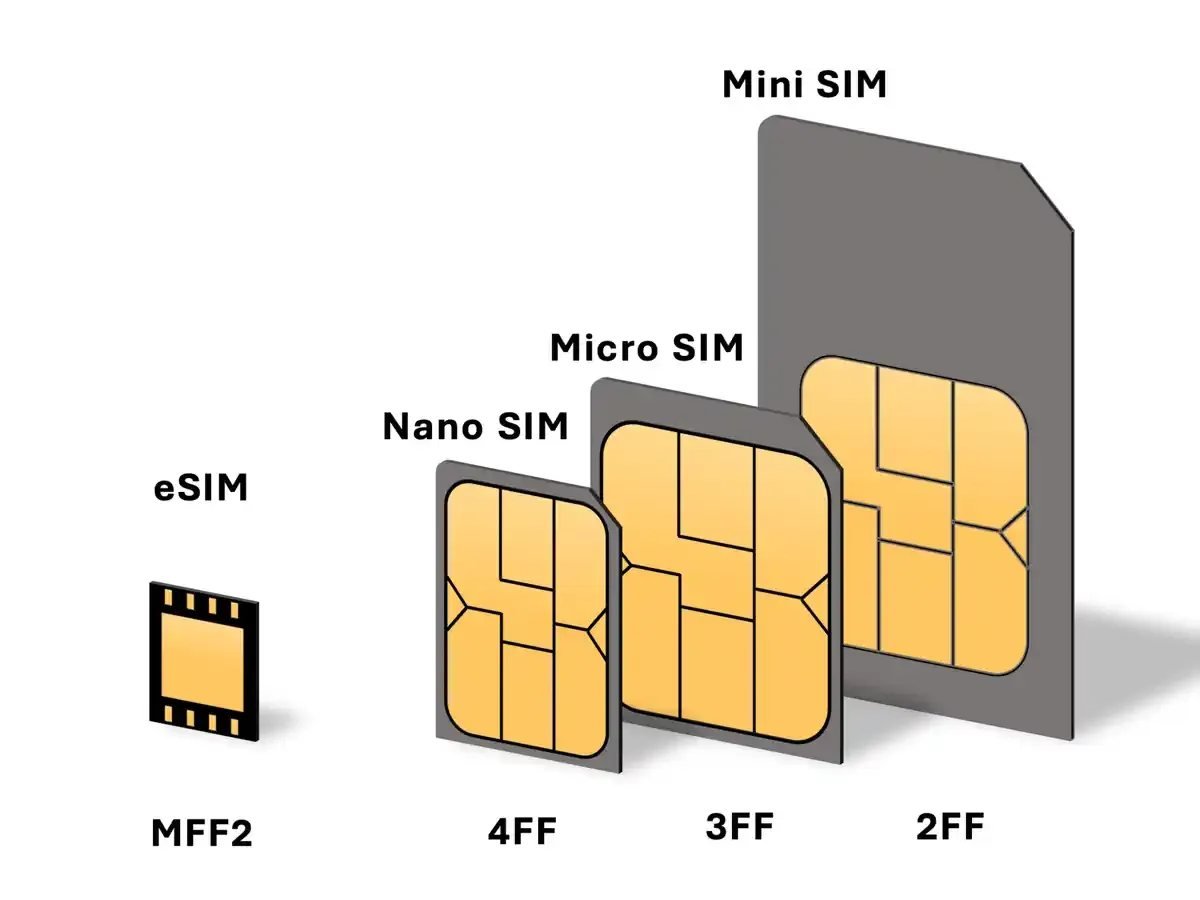
Table of Contents
Korea eSIM vs. Physical SIM vs. Pocket Wi-Fi: Quick Comparison
| Feature | Korea eSIM | Physical SIM Card | Pocket Wi-Fi |
|---|---|---|---|
| Setup Process | Install with a QR code before departure | Pick up at a counter or swap SIM trays | Pick up or receive a separate router, then connect by Wi-Fi |
| Phone Number | Often data-only; plan features vary | Some tourist plans include voice or a local number | No ordinary Korean phone number |
| Keeping Primary SIM | Possible on compatible Dual SIM devices | May require removing your original SIM | Your phone and SIM stay unchanged |
| Multiple Devices | Use phone tethering if the plan permits it | Use phone tethering if the package permits it | Designed to share one connection with several nearby devices |
| Separate Battery | No separate device to charge | No separate device to charge | The router must be charged and carried |
| Hotspot or Tethering | Depends on the exact data plan | Depends on the exact prepaid package | Shares its own mobile connection; no phone hotspot needed |
| Airport Queue | No counter visit when installed in advance | Possible wait at airport telecom counters | Pickup and return may require a counter visit |
| Device Requirement | Unlocked phone with eSIM support | Unlocked phone with a compatible SIM slot | Any device that can connect to Wi-Fi |
| Waitlists, Delivery, and Verification | Data works for app access; a data-only plan cannot receive ordinary Korean calls or SMS | A local number may help with calls or SMS, but tourist plans may still fail resident identity checks | Internet access only; it does not supply a phone number or identity verification |
| Group Travel | Best when each traveler has a compatible phone and separate plan | Best when each traveler needs an independent connection | Useful when the group stays together and shares one router |
| Typical Fit | Unlocked eSIM phone and data-first trip | In-person setup, older phone, or a checked voice/SMS requirement | Families, groups, or travelers connecting phones, tablets, and laptops together |
1. Korea eSIM: A Convenient Option for Quick Setup
If your smartphone is unlocked and supports eSIM technology, a travel eSIM is often the easier option. Compatibility varies by model and country of purchase, so check your device settings and manufacturer documentation before paying for a plan. With an eSIM, you purchase a data package online before departing, receive an activation QR code or app instructions, and install the plan in your phone settings. When your plane lands in Korea, switch cellular data to the new line and connect without visiting a service counter.You can compare South Korea eSIM plans before your trip. When choosing a plan, check the validity period, data allowance, hotspot support, and whether calls or texts are included.
Key Advantages of an eSIM
- No airport counter visit: Skip the telecom booth queue and head directly to your train, bus, or taxi.
- Keep your home line available: Compatible Dual SIM phones can keep the primary line active for verification texts while Korean data runs on the eSIM. Check roaming charges before leaving the home line enabled.
- No small plastic card: You do not need to store your original SIM card or carry an ejector tool.
Potential Drawbacks of an eSIM
- Many travel eSIM plans are data-only. Internet calling apps still work, but standard domestic voice calls may not be included.
- A carrier-locked device may reject an eSIM from another provider. Apple advises checking for “No SIM restrictions” under Carrier Lock and contacting the home carrier when an unlock is required.
- An activation QR code may be usable only once, so save the provider’s reinstall and support instructions before your trip.
If Your eSIM Does Not Activate
Stay on airport or hotel Wi-Fi while you troubleshoot. First confirm that the phone is unlocked, the new line is turned on, and mobile data is assigned to it. On iPhone, Apple recommends toggling Airplane Mode, turning the line off and on, restarting, and checking for a carrier-settings update. On Pixel, Google recommends checking that Mobile data and Use SIM are on; persistent eSIM errors should go to the carrier. Do not erase an installed eSIM unless the provider tells you to—Apple warns that deleting it may require the carrier to issue a new one.
Save the error message, order number, and the phone’s IMEI or EID, then contact the eSIM provider through its support channel. If service cannot be restored and the phone accepts a physical SIM, use a carrier roaming center at Incheon, Gimpo, Gimhae, or Jeju Airport, or buy a compatible physical USIM from another listed retailer. VISITKOREA lists the current options. An eSIM-only phone cannot use this fallback, so confirm device compatibility before relying on it.
2. Physical SIM Card: A Reliable Choice for In-Person Setup
Key Advantages of a Physical SIM Card
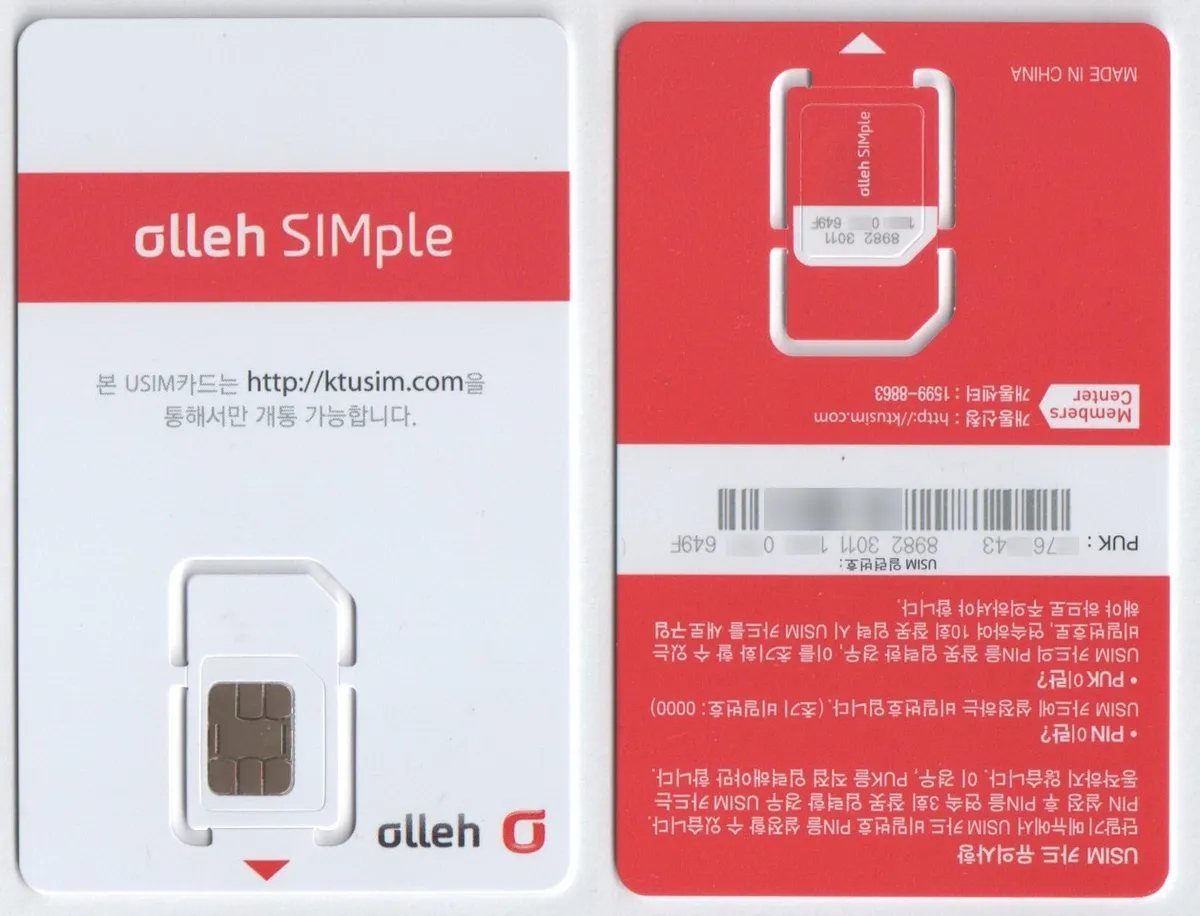
- Plan options with voice or a number: Some tourist SIM products include incoming calls, domestic voice options, or a local number. Always check the exact package before purchase.
- Local-number limits: A tourist plan may provide a Korean number for ordinary calls or messages, but that does not guarantee it will work for Korean identity verification, reservation, or waitlist systems. For a breakdown of data access, ordinary local numbers, and identity verification, see our Korean phone number guide. Check both the SIM package and the service you plan to use.
- In-person assistance: Airport or carrier staff can help install the card and confirm that mobile data works before you leave.
Potential Drawbacks of a Physical SIM Card
- You may need to remove your home SIM and store it safely throughout the trip.
- Airport service desks can have queues during busy arrival periods.
- Your home number will not remain active unless your device supports another simultaneous line.

When Pocket Wi-Fi Makes More Sense
A pocket Wi-Fi is a separate battery-powered router. It can be useful when a family or group wants to connect several phones, tablets, or a laptop without buying a plan for every device. In Korea, rental services may also call it a Wi-Fi egg.
- Consider it when: your group will stay together, you need to connect several devices, or a phone does not support eSIM but works normally on Wi-Fi.
- Check before booking: the data allowance, any reduced-speed policy, pickup and return location, deposit, and whether the router includes a charging cable.
- Remember the tradeoff: everyone loses the connection if the person carrying the router leaves, the battery runs out, or the device is returned early.
Last verified: October 2, 2026. VISITKOREA’s communications guide lists Wi-Fi egg rentals alongside traveler SIM and eSIM services.
Public Wi-Fi: Basic Safety Checks
Free Wi-Fi is common at Korean airports, stations, hotels, cafes, and some bus stops. Most modern websites encrypt their traffic, but it is still worth checking that you joined the network you intended to use.
- Confirm the exact network name on a sign or with staff instead of choosing a similar-looking hotspot.
- Look for HTTPS and do not continue past a browser security warning.
- When mobile data is available, use it for banking, payments, and password resets instead of an unfamiliar hotspot.
- Turn off automatic connection and forget the network after use if you do not plan to return.
The FTC’s public Wi-Fi guidance explains why encrypted websites make modern public networks safer while account and scam precautions still matter.
Choose by the number and verification you need
If a restaurant, delivery service, or booking form asks for a Korean number, check whether it needs only ordinary calls or SMS or requires identity verification. Buying a physical SIM is not a guaranteed workaround for a resident-only verification step.
Choose an eSIM If:
- Your smartphone is unlocked and supports eSIM.
- You want mobile data ready immediately after landing.
- You want to keep your home SIM available for banking or business messages.
- Your trip mainly involves navigation, messaging, translation, and social apps.
- You do not need ordinary Korean voice calls or SMS, or your chosen eSIM explicitly includes them.
- The plan explicitly allows hotspot use if you need to tether another device.
Choose a Physical SIM If:
- Your phone does not support eSIM profiles.
- You want staff to verify the connection at an airport or carrier counter.
- You need ordinary local calls or SMS and have confirmed that the exact package includes them.
- You understand that a tourist number may still fail resident identity verification.
- You are comfortable swapping and safely storing your original SIM.
Frequently Asked Questions
Does my phone need to be unlocked to use a Korea eSIM or SIM card?
Yes. Your phone generally needs to be carrier-unlocked to use a plan from another provider. On an iPhone, check Settings > General > About > Carrier Lock. If it does not show “No SIM restrictions,” contact your current carrier before traveling.Can I use taxi apps with a data-only eSIM?
Yes. A data-only eSIM can provide the internet connection that k.ride and navigation apps need. Kakao Mobility currently lists email, Google, and Apple registration routes plus payment with overseas-issued cards, while its terms allow additional verification such as a valid mobile number, email, or supported social account. Set up and test the account before your trip. Last verified: September 24, 2026.Can I buy an eSIM after arriving in South Korea?
Yes. You can purchase and install one while connected to reliable Wi-Fi. Installing it before departure is more convenient, but follow the provider’s activation timing because some plans begin when installed and others begin when first connected.How can I check whether my phone supports eSIM?
On iPhone, open Settings > Cellular or Mobile Data and look for “Add eSIM.” On supported Samsung Galaxy models, check Settings > Connections > SIM manager > Add eSIM. Support can differ by model, country of purchase, carrier, and software version, so confirm the exact device variant with Apple, Samsung, or your carrier. Last verified: September 24, 2026.Related Travel Guides
- How to Get from Incheon Airport to Seoul: AREX, Bus, or Taxi?
- Korea travel app guide
- Seoul subway guide
- cash and card guide for Korea